
DomainGuard threat intel, published for defense. Security teams can use it to detect and block this technique; anyone who runs into it can use it to recognize the lure and stay safe. Indicators of compromise are defanged.
What it is
ClickFix BSOD is a high-pressure evolution of the ClickFix social engineering technique. While standard ClickFix lures often mimic browser updates or CAPTCHA checks, the BSOD variant leverages a fake Windows Blue Screen of Death (BSOD) to create a sense of critical system failure.
The attack primarily targets the hospitality and travel sectors, often impersonating brands like Booking.com. Victims are led to believe their system has crashed or their browser is incompatible, and they are provided with a “fix” that involves pasting a malicious command into their terminal. This technique is designed to bypass traditional web security controls by having the user manually initiate the malware delivery.
How it works
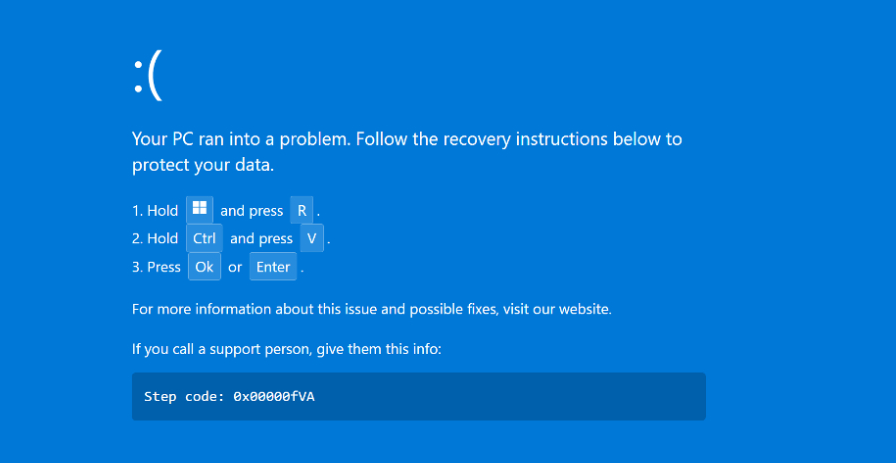
Travel-Themed Lure. The attack often begins with a phishing email impersonating a travel platform (e.g., Booking.com) sent to hotel or property management staff. The email claims there is an urgent issue with a reservation that requires immediate attention.
Urgency-Driven Landing Page. Clicking the link leads to a phishing site (e.g.,
low-house[.]com) that reinforces the pressure with all-caps warnings that the reservation is about to be cancelled.Fake BSOD Overlay. The site triggers a full-screen overlay that mimics a Windows BSOD. The overlay displays a QR code and a set of instructions that claim to restore the system.
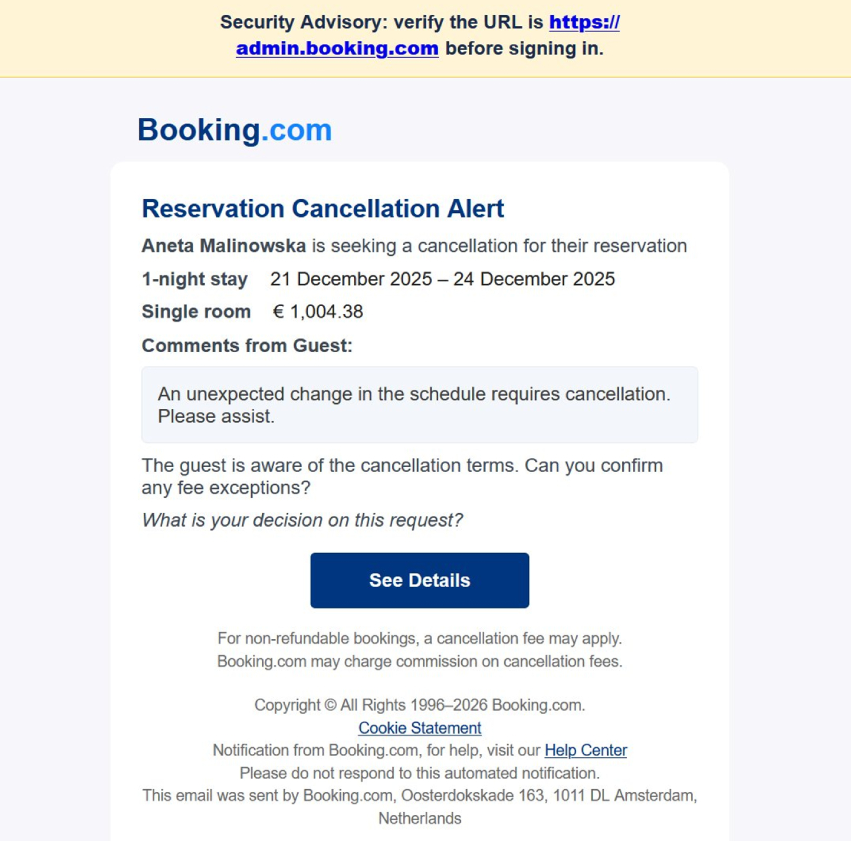
Fake Windows BSOD overlay displaying fraudulent recovery instructions. The “Fix” Instruction. The victim is instructed to open the Windows Run dialog (
Win+R), paste a pre-copied command, and press Enter. This command is a PowerShell downloader.MSBuild Proxy Execution. The pasted PowerShell command downloads a malicious Microsoft Build Engine (
.proj) file from an attacker-controlled server (e.g.,2fa-bns[.]com). It then executes this file usingMSBuild.exe:C:\Windows\Microsoft.NET\Framework\v4.0.30319\MSBuild.exe v.proj
Malware Deployment. By using
MSBuild.exe, the attackers can bypass many endpoint security policies that restrict direct PowerShell or script execution. The.projfile contains inline code that:- Configures Microsoft Defender exclusions for the malware’s working directory.
- Establishes persistence on the host.
- Downloads and executes the final payload, typically DCRat (a remote access trojan).
Why it still works
- High-Stakes Context. By targeting hotel staff with reservation cancellations, attackers ensure the victim is in a reactive, high-stress state.
- System-Level Authority. A BSOD is one of the most recognized and feared system errors. The victim’s focus shifts from “is this website real?” to “my computer is broken.”
- Living-off-the-Land (LotL). Using
MSBuild.exeto execute the payload is a classic LotL technique. Since MSBuild is a legitimate Microsoft tool, its execution is often trusted by default, and it can be used to run malicious code without a dedicated binary being caught by traditional AV signatures.
Signals to watch for
- Browser-Based BSODs. A real Windows BSOD will never occur inside a web browser window. If you can see browser UI elements or if the BSOD disappears when you close the tab, it is a scam.
- Instructions to use MSBuild. Legitimate technical support will almost never ask a user to run
MSBuild.exevia the Run dialog to fix a system error. - Unusual Domain Chains. Watch for traffic to randomized or unrelated domains (e.g.,
8eh18dhq9wd[.]click) used to host the initial lure or the second-stage.projfiles. - Defender Exclusions. Any process attempting to add widespread exclusions to Microsoft Defender via PowerShell or registry edits is a major red flag.
How to defend against it
- Block MSBuild for people who do not build software. An AppLocker or App Control for Business rule that denies
MSBuild.exeto standard users removes the proxy-execution step this chain depends on. Microsoft’s own recommended block rules list it for the same reason. - Take away the paste target. Removing the Run dialog for staff who do not need it (the “Remove Run menu from Start Menu” policy also disables
Win+R) and running PowerShell in Constrained Language Mode leave the lure’s instructions with nowhere to land. - Alert on Defender exclusion changes. A new exclusion added from PowerShell or the registry outside change management is a high-confidence signal, and Tamper Protection blocks many of the settings changes malware attempts.
- Harden the email path the lure arrives on. Booking-themed messages to hotel staff are the entry point: tag external senders, rewrite and detonate links, and give front-desk and reservations teams a fast way to report a suspicious guest message.
- Teach one rule. A real Blue Screen of Death never appears inside a browser tab, and no error screen asks you to paste a command to fix it.
Why it appears here
The ClickFix BSOD variant represents a significant shift toward more aggressive, high-friction social engineering. It demonstrates how attackers are moving away from subtle deception toward overt system-error mimicry to force user compliance. We track this campaign because it specifically targets the travel industry and uses advanced proxy-execution techniques that bypass standard security stacks. The lure domains themselves can be removed through the standard abuse process; our phishing site takedown guide walks through it.
Indicators of compromise
Domains
low-house[.]com(Initial phishing/BSOD host)2fa-bns[.]com(Payload delivery)8eh18dhq9wd[.]clickoncameraworkout[.]comasj77[.]com/asj88[.]com/asj99[.]comwmk77[.]com
Technical Indicators
- Process execution:
MSBuild.exebeing spawned with a local or remote.projfile path as an argument. - Payload file:
v.proj(or similar variants). - Final Malware: DCRat (Infostealer and RAT capabilities).