
DomainGuard threat intel, published for defense. Security teams can use it to detect and block this technique; anyone who runs into it can use it to recognize the lure and stay safe. Indicators of compromise are defanged.
What it is
Freemail phishing is impersonating a person or company from a free webmail account, such as Gmail or Outlook, rather than from a domain the attacker had to register. The account is real and the mail is legitimately authenticated. The deception lives entirely in the name on it.
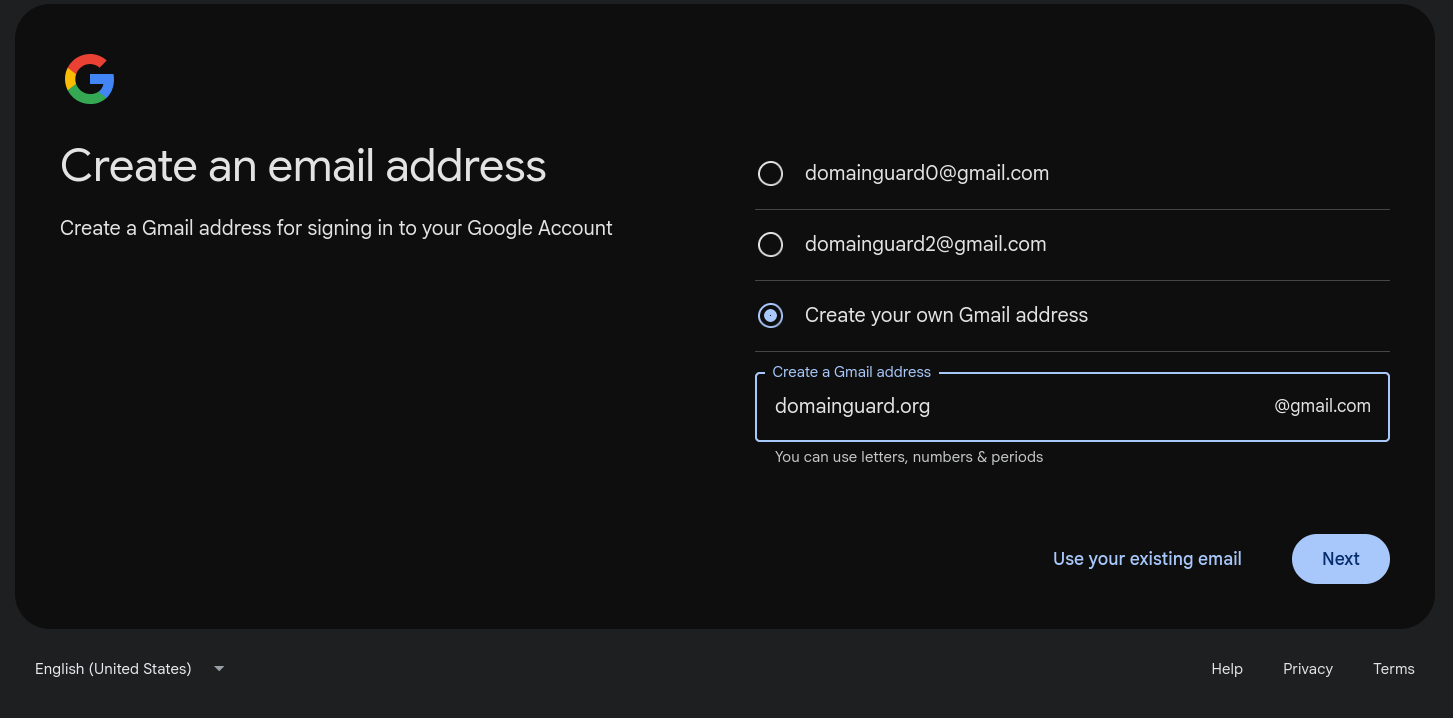
The core move is to register a lookalike Gmail account and turn its username into the disguise. The username is the part of an address before @gmail.com, the field where people normally put their own name, and Google lets it hold letters, numbers, and periods without ever checking who that name belongs to. So an attacker sets it to the target’s company name or domain and sends from [email protected], or to the real name of an executive or employee and sends from something like [email protected]. Either way it is the address itself, not just the display name beside it, that reads as someone the recipient already trusts. The screenshot at the top of this page is that registration in progress, using our own domain as the example.
The broader pattern needs no such trick. A generic free account with an executive’s name in the display field, or a personal webmail account that has been compromised, is the most common launch point for business email compromise (BEC), the invoice-and-wire fraud that the FBI records as one of the largest single categories of cyber loss year after year. Detection tooling has a name for the category, freemail, and industry writing also files these attacks under display name spoofing, CEO fraud, and Gmail impersonation. The common thread is that the trust is borrowed from a name, while the underlying mailbox is a free account anyone can open.
How it works
- Pick the target and the persona. The operator chooses whose authority moves money: a company’s finance team writing to its customers, an executive writing to an employee, or a known vendor writing to accounts payable. Public sources fill in the names, the reporting lines, and the language a real message would use.
- Register the free account. On Gmail’s signup screen the attacker chooses “Create your own Gmail address” and types the disguise into the username field. A username of the form
yourcompany.comis valid: Google’s rules allow letters, numbers, and periods, ask for six to thirty characters, and only forbid a leading, trailing, or doubled period, none of which a domain-shaped name trips. Because Gmail treats periods as insignificant,[email protected]and[email protected]are the same inbox, and the first person to register the name owns the entire family of dotted variants. - Set the display name. The account’s display name is free text, and it is the field most inbox clients show first. The attacker sets it to a person or department the target trusts, so in a message list the recipient sees only that name.
- Send the lure. No malware and no link to a cloned site is required. The message is usually a plain request: a new invoice, an updated set of wiring instructions, or a quiet change to the bank account on file, timed to a real transaction where possible. When the attacker can see an existing email thread, the request is dropped into it so it reads as continuation rather than cold contact.
- Redirect the payment. The reply comes back to the same Gmail account, the target updates the payee details or pays the invoice, and the money lands in an account the operator controls. By the time the real company is asked about the payment, the funds have usually moved on.
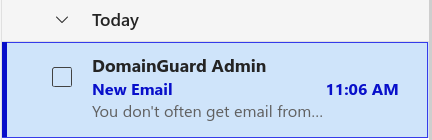
What the target actually sees depends on whether the message is open. In the inbox list, only the display name shows, and nothing about it looks off:
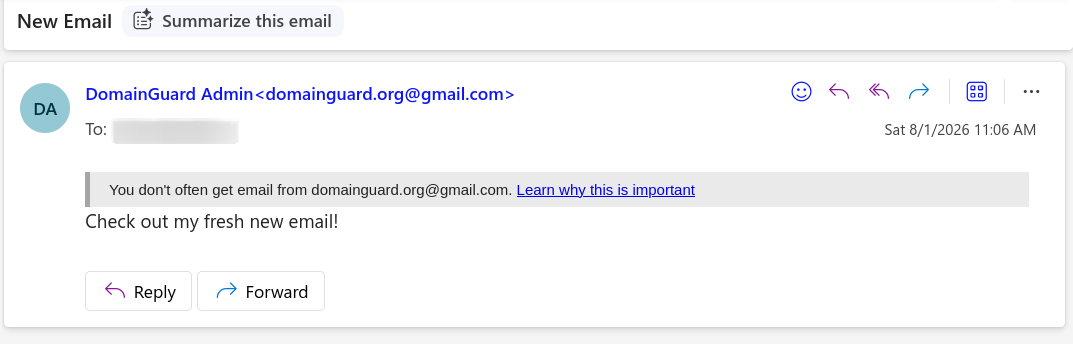
Opening the message reveals the address, but the strongest warning most clients raise is a generic first-contact notice, not an authentication failure, because there is no authentication failure to report:
Common patterns
- Company or employee name as the username. The username, the part before
@gmail.com, is set to impersonate rather than to identify the sender: the target’s company name or domain so the address reads as the brand ([email protected]), or the real name of an executive or staffer so it reads as that person. The university examples further down are this shape, pairing a real person’s identifier with the institution’s domain. - Executive display-name spoof. A generic address such as
[email protected]carrying the display name of a CEO or CFO. It is cheaper and faster than the domain trick, and on a phone, where many clients show only the display name, just as convincing. - Vendor and clerk personas. Addresses shaped to read like a billing contact,
[email protected]or[email protected], used to push invoices or bank-change requests to a company’s accounts-payable team. - Compromised personal accounts. Not every freemail attack starts with a fresh registration. A real Gmail account belonging to an employee, a supplier, or a company owner, taken over in an earlier phishing round, sends the fraudulent request from a genuinely trusted address. This is the registered-or-compromised half of the pattern, and it is why a familiar sender is not proof of a safe message.
Gmail dot accounts: many addresses, one inbox
Gmail reads a username as if its periods were not there. [email protected], [email protected], and [email protected] are the same mailbox spelled three ways, and Google documents the rule as “dots don’t matter”: mail sent to any dotted spelling of a username is delivered to the account that owns the name, and nobody can register an address that differs from an existing one only in its periods. Inside Gmail that is a protection. Nobody can open [email protected] to pose as [email protected], because whoever registers a name first, attacker or defender, owns its entire dotted family.
The trouble starts outside Gmail, because nearly every other system treats an email address as a literal string. To a retailer’s signup form, a SaaS free-trial flow, or a government benefits portal, [email protected] and [email protected] are two different people. Each dotted spelling sails past the “an account with this email already exists” check as a brand-new user, and a name does not need many letters to supply a deep pool of them: a nine-letter username has 256 possible spellings, a fourteen-letter one more than eight thousand. Every account created this way sends its confirmation links, verification codes, and password resets to the same single inbox, so one operator can register, verify, and run hundreds of seemingly unrelated identities on a target system from one Gmail login. That is the mechanic in the Scattered Canary case below, where at least 259 dotted variations of one address filed fraudulent unemployment and IRS claims that the receiving agencies each counted as a distinct applicant.
For the systems on the receiving end the fix is normalization: treat gmail.com addresses as equal if they match after the periods are removed, the same way many platforms already strip Gmail’s better-known name+anything suffix. The plus trick is easy to spot and widely filtered; a dotted variant looks like an ordinary, well-formed address and passes any comparison that takes the string at face value. For a brand, the same first-registration rule is the cheap defensive move covered below: register your own undotted name once and every dotted spelling of it, including the one shaped like your domain, is claimed before an attacker can take it.
Why it still works
The address carries the exact domain string the reader is looking for, or a trusted name in the only field their client shows. Inbox lists and mobile clients display the sender’s name and hide the address behind it, so the gmail.com part never surfaces until someone opens the message and reads the header, which few people do for mail that looks routine.
The mail is also technically clean. It is genuinely sent from Gmail, so it passes SPF, DKIM, and DMARC for gmail.com and arrives with the sending reputation of the world’s largest mail provider. The victim company’s own DMARC policy, the control that stops spoofing of its exact domain, is never consulted, because the message does not claim to come from that domain. The strongest signal a well-configured mailbox tends to raise is a soft first-contact banner like the “You don’t often get email from this address” notice in the screenshots above, which reads as mild novelty rather than alarm.
And there is nothing to take down. A lookalike-domain campaign leaves a registration, a WHOIS record, usually a certificate in the transparency logs, and an MX entry, each an artifact a monitoring service can catch during the quiet window before the domain is used. A free webmail account leaves none of these. It costs nothing, opens in minutes, and never touches the systems that domain monitoring watches, so the fraud can run without ever crossing that radar.
Notable incidents
Public, verbatim examples of the domain-as-username registration are easiest to find in university security advisories, because campuses publish their phishing samples. Their information-security offices have documented the exact construction:
- The University of California, Berkeley published a sample in which the chancellor was impersonated from
[email protected], the campus domain folded straight into the Gmail username, under the display name “Carol T Christ, Chancellor.” - The University of Illinois Chicago warned staff about messages from addresses such as
[email protected], noting they are “crafted to trick the recipient at first glance but are not really from a UIC.EDU address.” - Cornell’s IT security team documented the same
[email protected]shape targeting its community.
The money side of the pattern shows up in fraud research. Agari’s investigation of the group it named Scattered Canary found a single Gmail account weaponized through the dots-don’t-matter rule, with at least 259 dotted variations of one address used to create and separate hundreds of fraudulent claims against state unemployment programs and the IRS during 2020. The same firm’s profile of a BEC crew it called London Blue described operators working from “a free and temporary email account with an imposter display name” against a target list of roughly 35,000 finance executives, one of whom was Agari’s own CFO.
First documented
Fraud from free webmail is as old as free webmail. Advance-fee scammers worked from Hotmail and Yahoo addresses in the 1990s, and the business-impersonation form matured into what the FBI now labels business email compromise and email account compromise. Its Internet Crime Complaint Center began tracking the category around 2013, and its cumulative tally of reported BEC losses reached more than $55 billion across 305,000 incidents for the decade ending in 2023.
The refinements are more recent. The dots-don’t-matter trick for running many identities from one inbox, and the habit of shaping the username as the target’s own domain, are the modern layer, documented through the university advisories and fraud research above rather than tied to a single origin event. The technique has no patient zero. It is the predictable result of a free, unverified account being a valid sender.
Signals to watch for
- A sender on a free webmail domain whose local part contains your company’s name or domain string, or a vendor’s, such as
[email protected]. - Any request to change bank details, redirect a payment, or pay a new invoice that arrives from a Gmail, Outlook, or other free-webmail address, especially one that asks to keep the conversation over email.
- A display name matching one of your executives or a known vendor contact sitting on top of an external, unrelated address.
- A reply-to or return-path pointing to a free account different from the visible sender, a long-standing tell that mail filters flag under their freemail rules.
How to defend against it
- Verify payment changes out of band. Confirm any change to payee details by phone, on a number you already hold, however authentic the thread looks. This one control defeats most freemail business email compromise.
- Flag freemail senders that use your name. Mail-flow rules can tag or quarantine messages from Gmail, Outlook, and other free providers whose display name or address contains your company name, your domain, or an executive’s name.
- Make external mail look external. An external-sender banner makes a familiar display name on an outside address stand out instead of blending in.
- Run business mail from your own domain. The FBI’s own guidance is to keep company correspondence off free accounts, which gives customers and vendors a simple rule: real mail from you never comes from a free webmail address.
- Claim the most convincing shape. Registering your own brand’s dotted Gmail name once, so
[email protected]cannot be taken, closes the single most convincing address. - Report fast. Google’s Gmail abuse report is the channel for an address already impersonating you. Warn anyone in an active payment conversation at the same time.
Why it appears here
Most of this catalog is about infrastructure an attacker has to build, and that a defender can therefore watch: a lookalike domain that has to be registered, a phishing page that has to be hosted, an ad that has to be bought. Freemail phishing is the case that skips all of it. There is no domain to catch during its quiet window, no certificate in the logs, and nothing to report to a registrar, because the attacker never registered anything. It runs on the same economics as scammers using free Zoom and Teams accounts to run fake interviews: when a trusted platform hands out free, unverified identities, impersonation costs nothing.
That does not make it invisible, only invisible to domain monitoring alone. It surfaces in the mail stream, in the mismatch between a display name and its address, in a payment request that breaks the normal pattern, and sometimes in a paired lookalike domain the same operator registers for the web half of the fraud, which can be taken down like any phishing site. Business email compromise remains one of the most expensive attack categories in the FBI’s figures, and a free account with the right name on it is still the most common way in. Watching your own domain for impersonators is necessary. Recognizing the message that never touched your domain at all is the other half.
Frequently Asked Questions
Can someone really create a Gmail address that contains my company's domain?
Yes. Google lets a Gmail username contain letters, numbers, and periods, and it never checks that the name matches a domain you own, so anyone can register [email protected] and send from it. Because Gmail ignores periods, that address and [email protected] are the same account, and whoever registers the name first owns every dotted variant of it.
What is the Gmail dot trick?
Gmail ignores periods in usernames, so [email protected] and [email protected] are the same account, but most other websites treat them as two different email addresses. One Gmail account can therefore register many seemingly unique accounts on another system, with every verification email and password reset landing in the same single inbox. Sites can close the gap by stripping periods from gmail.com addresses before checking whether an email is already registered.
Why do these emails get past our email security and DMARC?
Because the mail is genuinely sent from Gmail. It passes SPF, DKIM, and DMARC for gmail.com and arrives with Gmail's sending reputation, so it is not spoofing in any technical sense. Your own DMARC record only protects your exact domain, and it is never checked for a message sent from gmail.com, so it gives no protection against this.
How is freemail phishing different from a lookalike domain?
A lookalike domain is a separate domain the attacker has to register, such as acme-billing.com, which leaves a WHOIS record, usually a certificate, and a registration a monitoring service can catch. Freemail phishing registers no domain at all. It uses a free webmail account, so there is nothing for domain monitoring to see, but it also cannot host a website or receive mail at a custom address.
What should we do if a Gmail address is impersonating our company?
Report the address to Google through its Gmail abuse form, which can lead to suspension of the account. Warn any customer or partner in an active payment conversation to confirm banking details by phone using a number they already have, rather than by replying. Watch for a paired lookalike domain too, since the same operator often registers one for the web side of the fraud.
Does registering our own domain-named Gmail address help?
It helps cheaply against one specific shape. Because Gmail ignores periods, registering [email protected] once claims every dotted variant, including [email protected], so no attacker can take that exact address. It does not stop other freemail shapes such as [email protected] or a display-name spoof from an unrelated address, so treat it as one small control rather than a fix.