
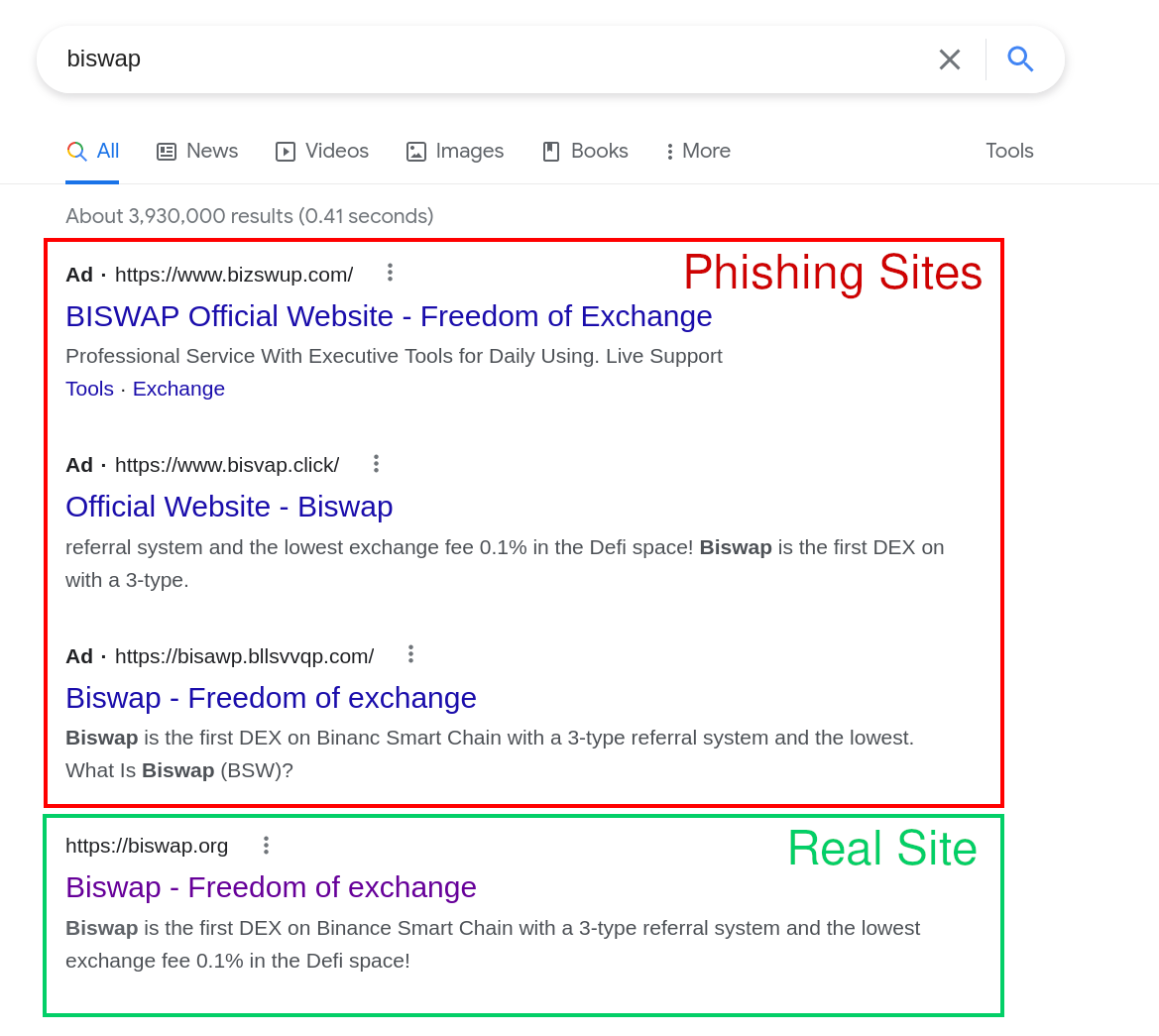
DomainGuard threat intel, published for defense. Security teams can use it to detect and block this technique; anyone who runs into it can use it to recognize the lure and stay safe. Indicators of compromise are defanged.
What it is
Google Ads phishing is the practice of buying paid search ads against brand or product keywords, then directing the click to a lookalike domain hosting a phishing page. Because the ad sits above the organic results, it intercepts traffic before users ever see the legitimate site.
How it works
- Register a lookalike domain that mimics the target brand (
ad-wordsgoogle.com,pay-pal-secure.com, and similar variants). - Stand up a clone of the brand’s login or download page on that domain.
- Buy a Google Ads campaign bidding on the brand’s own keywords, with ad copy that looks indistinguishable from the legitimate listing.
- Outrank the brand’s organic listing, sometimes outranking the brand’s own paid ad. Users click, log in, credentials are captured.
Why it still works
Users trust the top result. The convention of typing a brand name into Google and clicking the first link predates every signal-of-trust feature search engines have shipped since, and it has not changed. Ads inherit that trust without earning it.
The ad-review process is automated, scaled, and reactive. Malicious creative can run for hours, sometimes days, before being pulled, long enough to clear the campaign goals and disappear before manual review catches up.
First documented
The earliest publicly documented case is from 2008, when an attacker bought ads against the keyword “adwords” itself, pointing to ad-wordsgoogle.com, which delivered a malware payload. The irony aside, the technique was already mature: attackers understood the ad model well enough to target the platform that hosted them.
The 2008 domain is still available to register today for anyone who wants to hold onto it for nostalgia.
Signals to watch for
- New domain registrations matching brand keywords, paired with active Google Ads campaigns on those same keywords.
- Sudden click traffic from paid search to a brand-adjacent property your organization does not own.
- User reports of “the website asked me to log in again right after I clicked an ad.”
- Pixel-perfect clones of your login page appearing on domains that share visual or character similarity with your real domain.
How to defend against it
- Watch paid search on your own brand terms. Search your brand and product keywords regularly, or have a monitoring service do it, and treat any ad pointing at a domain you do not own as an incident.
- Report the ad and the domain together, the same day. Google’s ad-reporting channel gets the ad pulled; an abuse report to the registrar and host takes down the landing page, so the next ad cannot reuse it.
- Catch the landing domain before the ad runs. Every campaign needs a lookalike domain to send the click to, and spotting it at registration buys you the staging window.
- Give users a safer default. Bookmarks for login and download pages, and DNS filtering of newly registered domains, remove most of the exposure. Some organizations also block search ads in the browser for high-risk teams such as finance and IT administrators.
- Teach one rule. For anything that asks you to sign in or download, type the address or use a bookmark instead of clicking the top search result.
Why it appears here
Eighteen years on, the same attack pattern keeps surfacing. We see fresh variants every week against banks, crypto exchanges, SaaS login portals, and software download pages. The vector has not been closed, and the attacker economics (low cost per impression, high yield per credential captured) have not changed. When an ad-delivered phishing domain surfaces, the removal path is the same as for any phishing site; our phishing site takedown guide walks through it step by step.
Further reading
For the longer-form treatment with examples and reports from the security community, see our blog post on Google Ads Phishing.