
Scammers using free video conferencing accounts to impersonate brands.
TLDR;
Threat Actors Have Been Weaponizing Free Video Conferencing Accounts to Impersonate Brands to Scam People.
Intro
DomainGuard has recently seen a surge in a specific, highly damaging threat actor tactic: the fake job interview.
For companies, trust and brand recognition are your primary currency. When a threat actor uses your logo to scam a job seeker out of thousands of dollars, steal their identity, or install malware, the victim rarely blames the anonymous scammer. They blame the institution whose name was on the door. We have seen this firsthand with our clients.
The Playbook
Step 1: Setting the Trap
This attack begins with the most effective lure in existence: a paycheck. Which in my opinion, is also one of the saddest components of this technique. Attackers target a demographic that grows larger with every market shift: desperate job seekers.
They scrape actual job descriptions and mirror them on fake LinkedIn profiles. By impersonating your HR teams, recruiters, or executives, they create a digital footprint designed to bypass the instincts of a candidate eager to land their next role. Desperation is a powerful blind spot, and attackers know exactly how to exploit it.
Sometimes these puppets are supplemented with lookalike domains hosting cloned websites, and configured with associated mail infrastructure:
- acme-jobs.com
- acme.help
- acme.jobs
However, as you will see below, this step isn’t necessary.
Step 2: Payload Delivery by Video Call
Next comes the outreach. The puppets built in step one are used to invite candidates to a remote interview. Threat actors love using free Zoom, Webex, or Teams accounts because these platforms allow them to remain largely anonymous while hiding behind a corporate logo, and continue the ruse of using display names of legitimate people.
During the interview, the attacker might keep their camera off, blaming technical difficulties. In more sophisticated campaigns we are seeing in 2026, threat actors are even leveraging deepfake audio and video to appear as a real executive. The candidate genuinely believes they are talking to your leadership team.
Step 3: The Payload
The endgame varies, but the damage is always severe.
- The Advance-Fee Scam: The candidate is “hired” and asked to purchase remote work equipment from a fake vendor using a fraudulent check. When the check bounces, the victim is left paying the bill. This scam still works because the bank can take 3-5 days or longer to verify the check, but will make the check funds available in the victim account for convenience. US law and the slow check clearing system is also a factor.
- Sensitive Information Harvesting: The victim is asked to provide their Social Security number, banking details, and government IDs for “onboarding.”
- Malware Deployment: In campaigns dubbed the “Contagious Interview,” candidates are tricked into downloading what they think is secure meeting software. In reality, it is malware designed to silently steal credentials and hijack browser sessions.
We have even seen variants targeting developers where a “coding challenge” requires a GitHub pull. Hidden in the software is a script which harvests crypto wallets and steals passwords when executed.
Why is this possible?
Our most recent encounter with this technique illustrates this blind spot, while also raising some serious questions.
Our customer learned of several fake interview attacks in recent weeks. We had previously identified a lookalike domain for this customer, and were actively monitoring it for evidence of abuse. With email configured for this lookalike, and now a malicious video conferencing account tied to the domain, we had enough for a takedown. So that’s what we did.
The domain was dead. No DNS, no MX records, no way to send an email. We also reported the associated video conferencing account. Problem solved, right?
Not quite. Days later, the customer received a screenshot of a fake interview in progress. The scammer was using the exact same account we had reported. How?
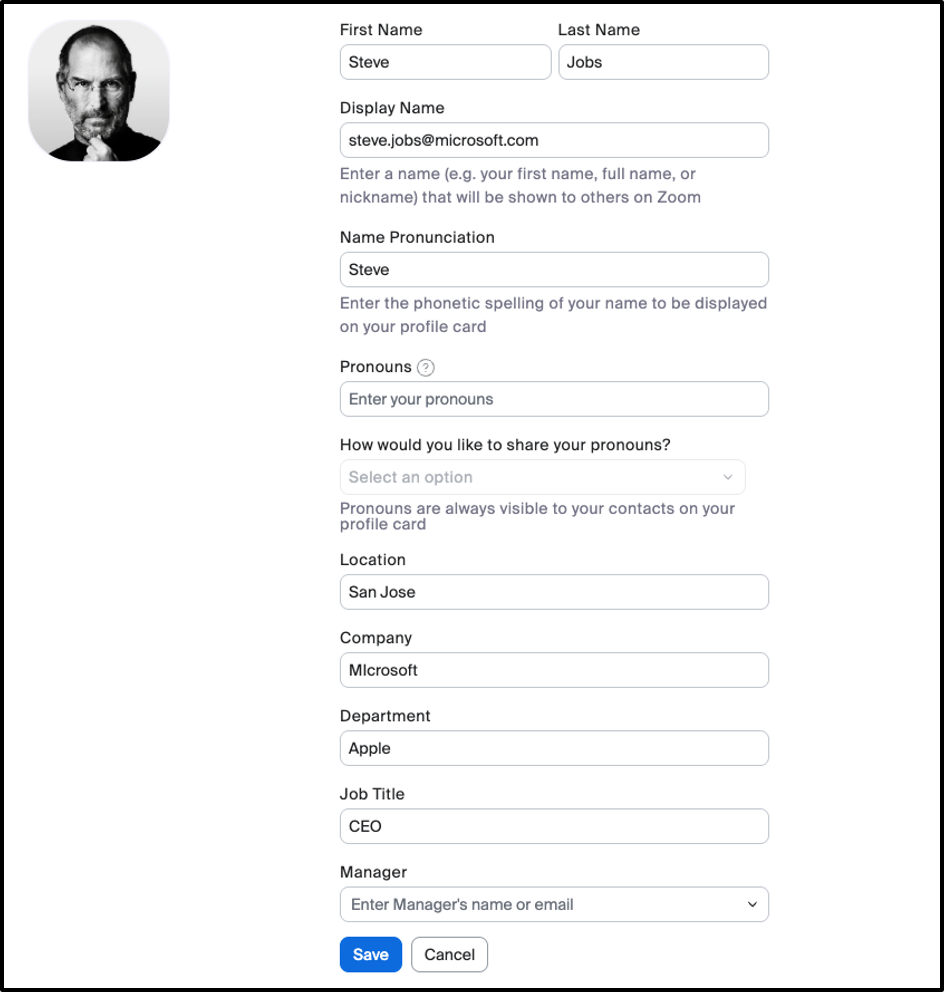
After some testing, we found that free accounts created on these platforms require zero validation other than a valid email address to sign-up. You can set the display name and other fields to anything you want! Which is not necessarily a bad idea and can even be playful for many. However, something that was built for flexibility and fun, actually became an abusive way to victimize society.
Free Zoom Account Setup
Convincing Impersonation
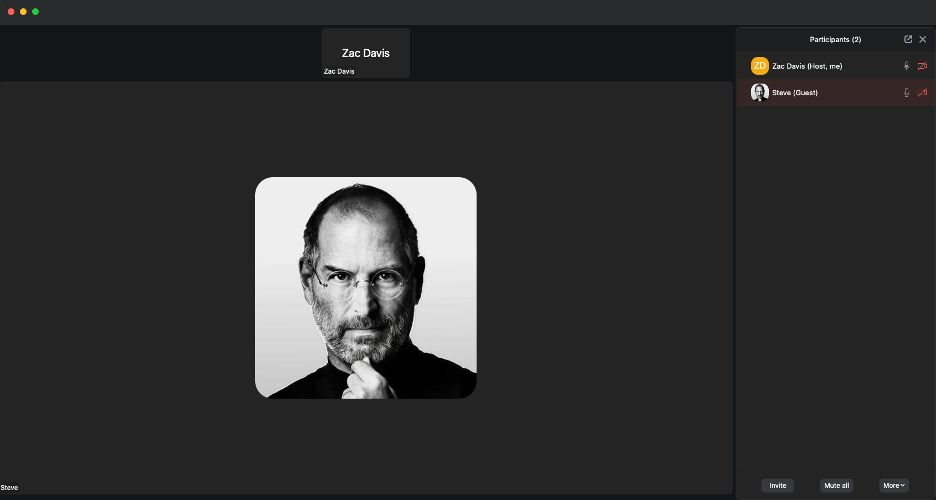
Simple setup takes minutes and you have a convincing impersonation on a well-known and familiar medium. To make it even easier, if you are the one joining the meeting as a guest, you can literally set any string you want as the display name.
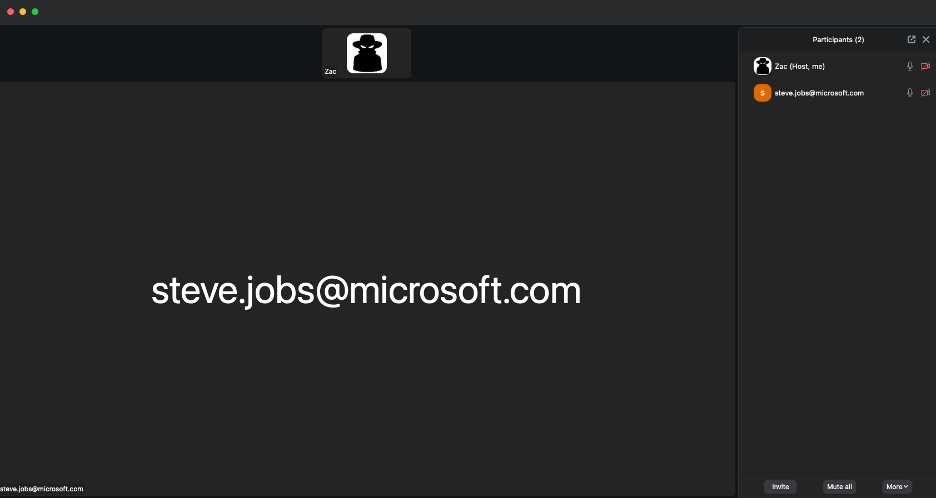
Guest Display Name Control
So, EVEN if the underlying email domain is nuked, the video conferencing accounts are still active and can still be used to impersonate a brand easily. Attackers can change the display name and username to whatever they want, appearing as a verified corporate representative while operating off a completely free account which is setup in minutes.
This left us asking the questions of “is it really this easy? I can think of 10 other potential lures I could use to attack a corporate environment using a similar setup.
Now what?
I must admit that we are not entirely sure what actions were taken. We reported the abuse and reached out to the platforms involved, but the only response we received was: “It’s been addressed.”
What exactly was addressed remains unclear. Was the video conferencing account disabled? If so, why are we continuing to observe the same threat actor repeatedly? Are they simply creating new accounts that are not tied to the original fraudulent video conferencing account?
Video conferencing providers need to recognize that their technology will inevitably be abused when there is little or no identity verification. Platforms should seriously consider stronger safeguards to prevent misuse rather than relying solely on abuse reports after the fact. Understanding how their technology can be exploited and proactively designing solutions should be a priority.
In the meantime, we felt it was important to raise awareness of this attack vector. Tell your friends and family. Inform your coworkers. We know this technique is being used in many other contexts, so stay vigilant and Guard Your Domain.
Need more assistance?
If you found the information above difficult to consume or need additional assistance, please reach us by email at [email protected] or by filling out the contact form below.
